project no. 01
Building Werkora, a manufacturing ERP
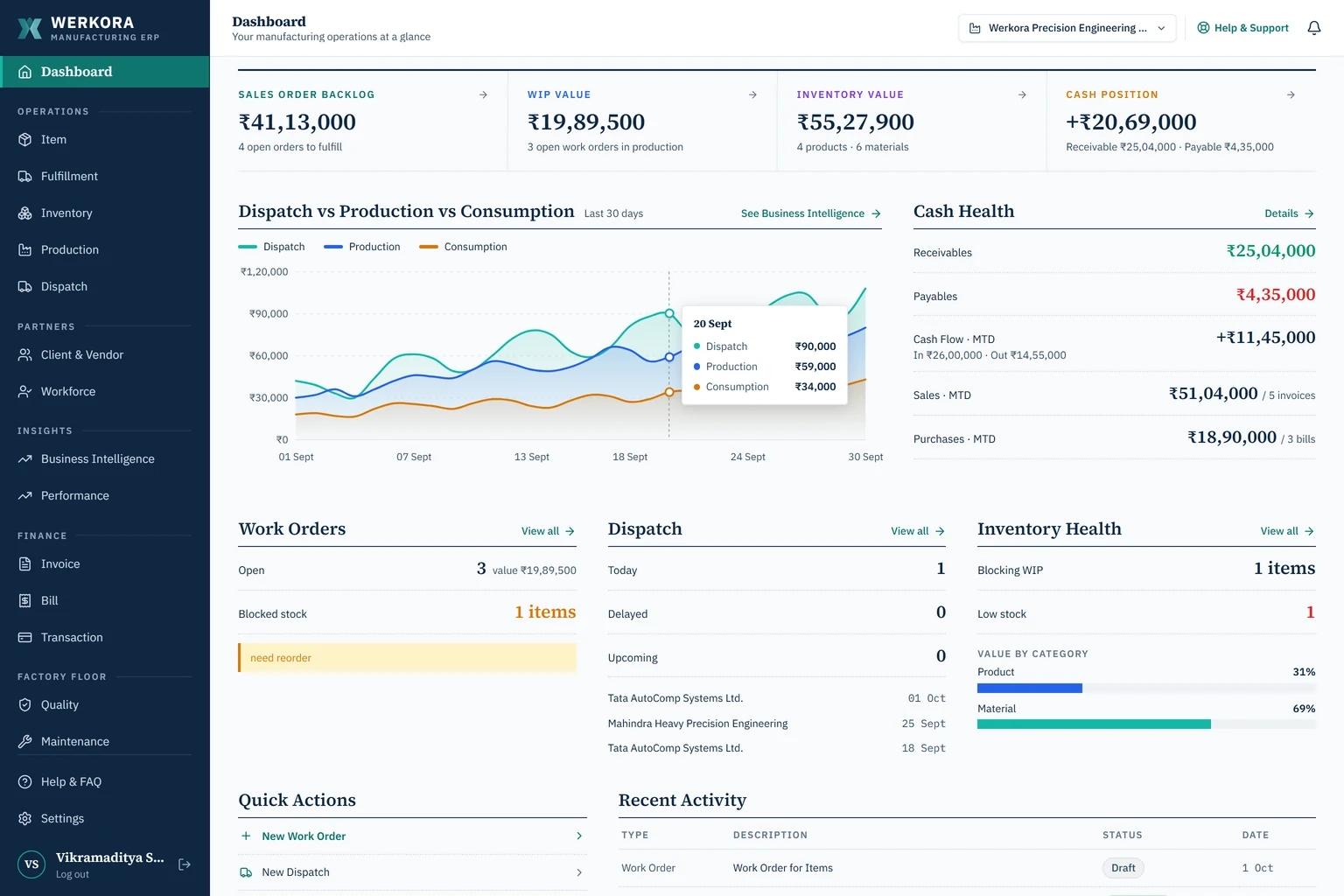
An ERP for small machine shops and fabrication units in India. Orders, stock, production, dispatch and invoices in one system, live at werkora.in (opens in a new tab).
- Role
- Founder: product, design and build
- Timeline
- 2025 – now
- Status
- Live
- Platform
- Web; cloud or self-hosted
- Stack
- Next.js, TypeScript, PostgreSQL
problem
Small plants run on Excel BOMs, paper job cards and a stock register updated once a month.
solution
One system where each step reads what the last one wrote, from order to invoice.
where it is
Live at werkora.in, with 260+ automated tests behind it.
· the problem
what small plants run on
A 30 to 40 person machine shop usually runs on four things that don't talk to each other:
- bills of materials in Excel, in more than one version
- job cards on paper that get lost on the floor
- a stock register updated monthly, so shortages surface mid-job
- accounting software that knows the invoice but not the job behind it
SAP-class systems are too heavy for these plants. Accounting tools are too thin. Werkora sits in between.
· the flow
how a job moves through it
The whole product follows one idea: each step reads what the last one wrote. A sales order becomes a work order, then a dispatch, then an invoice, with no re-typing in between.
the accountant in me: if it's typed twice, it'll disagree by month-end.
step 01
order and shortfall check
A sales order is checked against stock as soon as it's confirmed. Shortfalls show up before production starts, not halfway through.
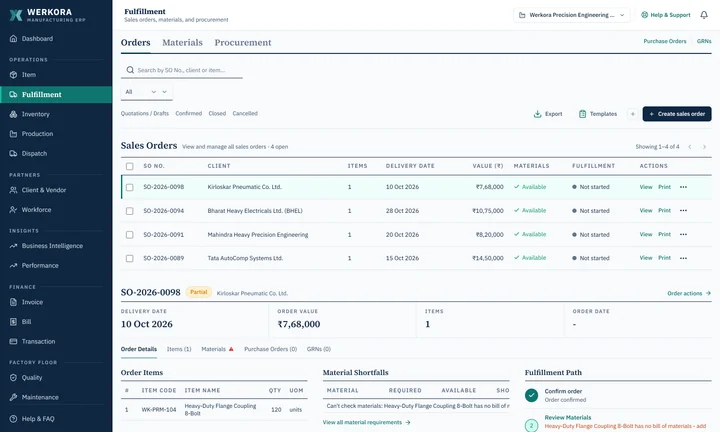
fig. 02 — a sales order and its material shortfallsfull size (opens in a new tab) step 02
materials, by batch
Goods arrive against a GRN with lot number, rate and supplier. Stock is used first-in, first-out, so valuation and traceability hold up.
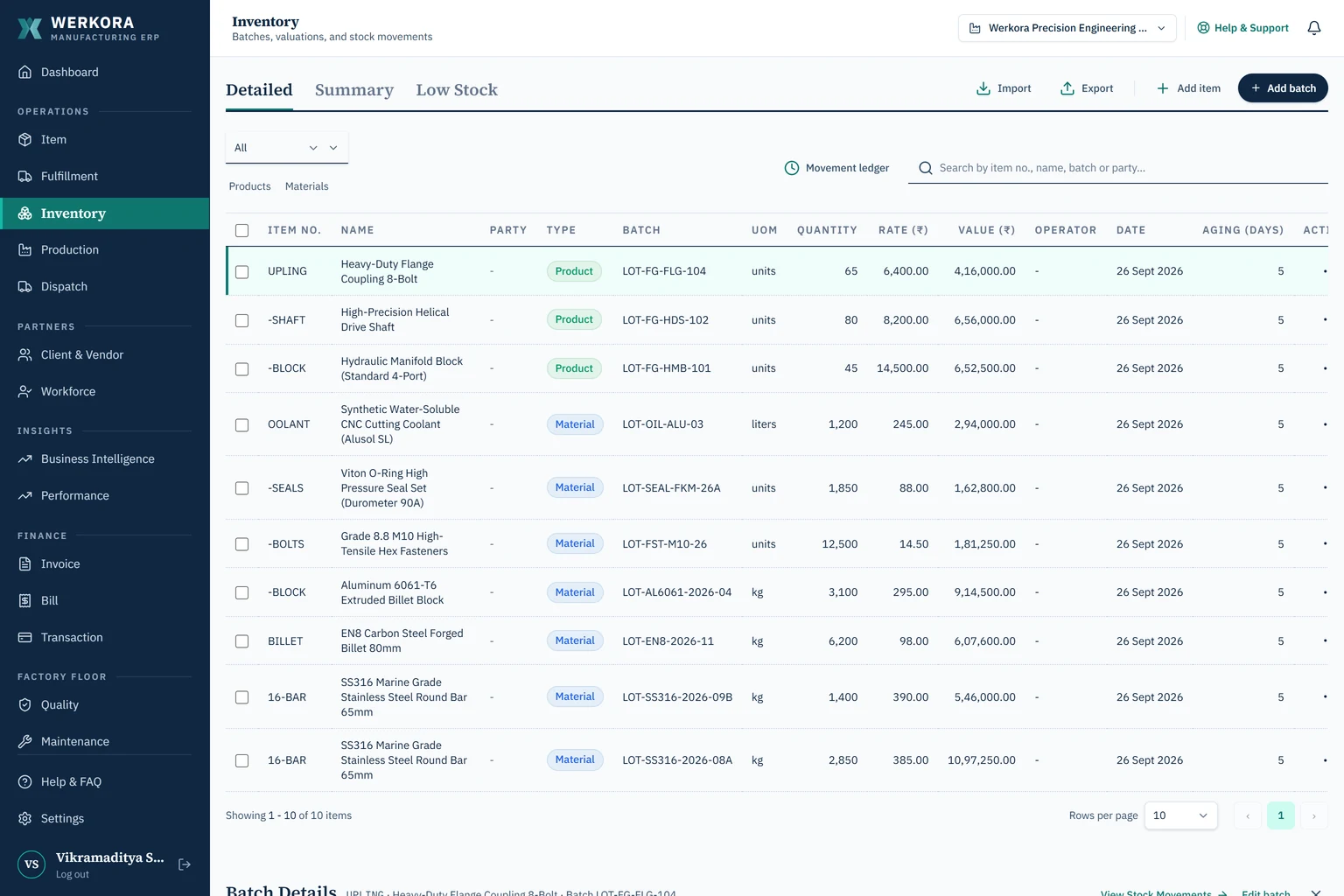
fig. 03 — stock held by lot, with rate and agefull size (opens in a new tab) step 03
work orders
Each work order takes its materials from the bill of materials. Operators log progress and scrap by stage; supervisors print the job traveller.
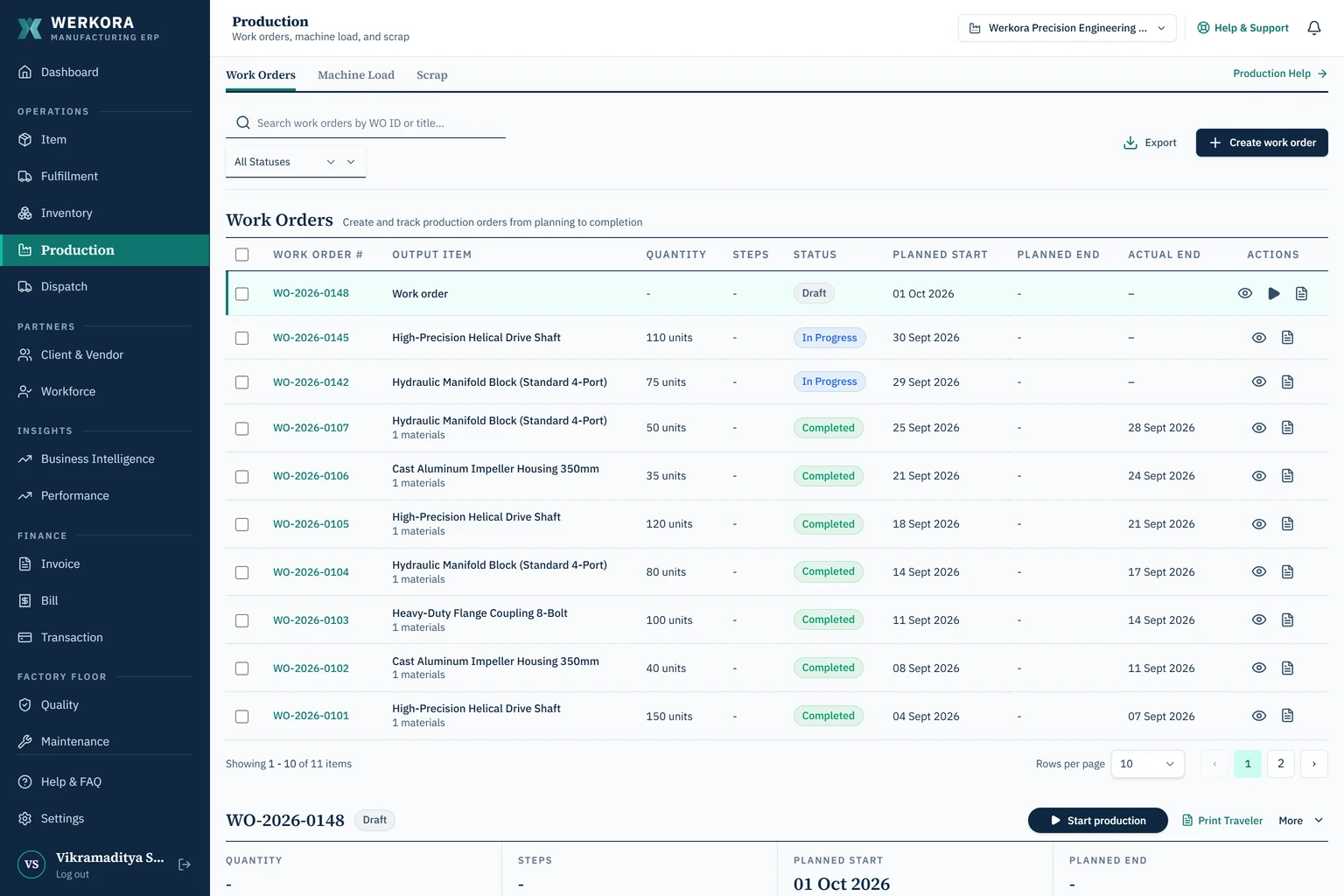
fig. 04 — work orders from draft to donefull size (opens in a new tab) step 04
dispatch and invoice
Releasing a dispatch draws the stock, raises the invoice and updates the sales order in one step. The customer can be told on WhatsApp.
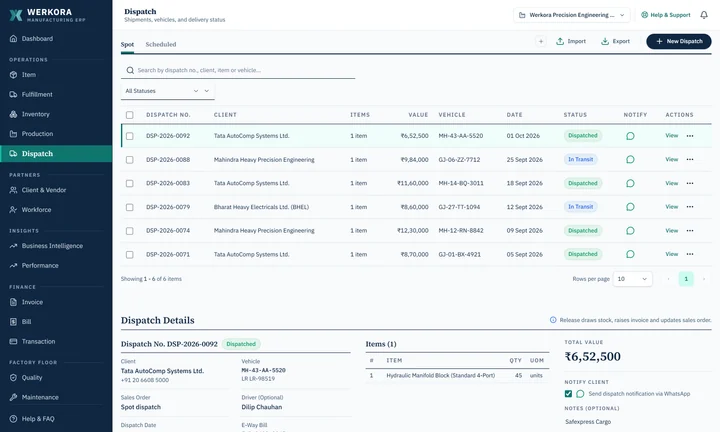
fig. 05 — one release, three records updatedfull size (opens in a new tab) step 05
the month in numbers
Production, dispatch, scrap, receivables and downtime against monthly targets, without anyone building a report.
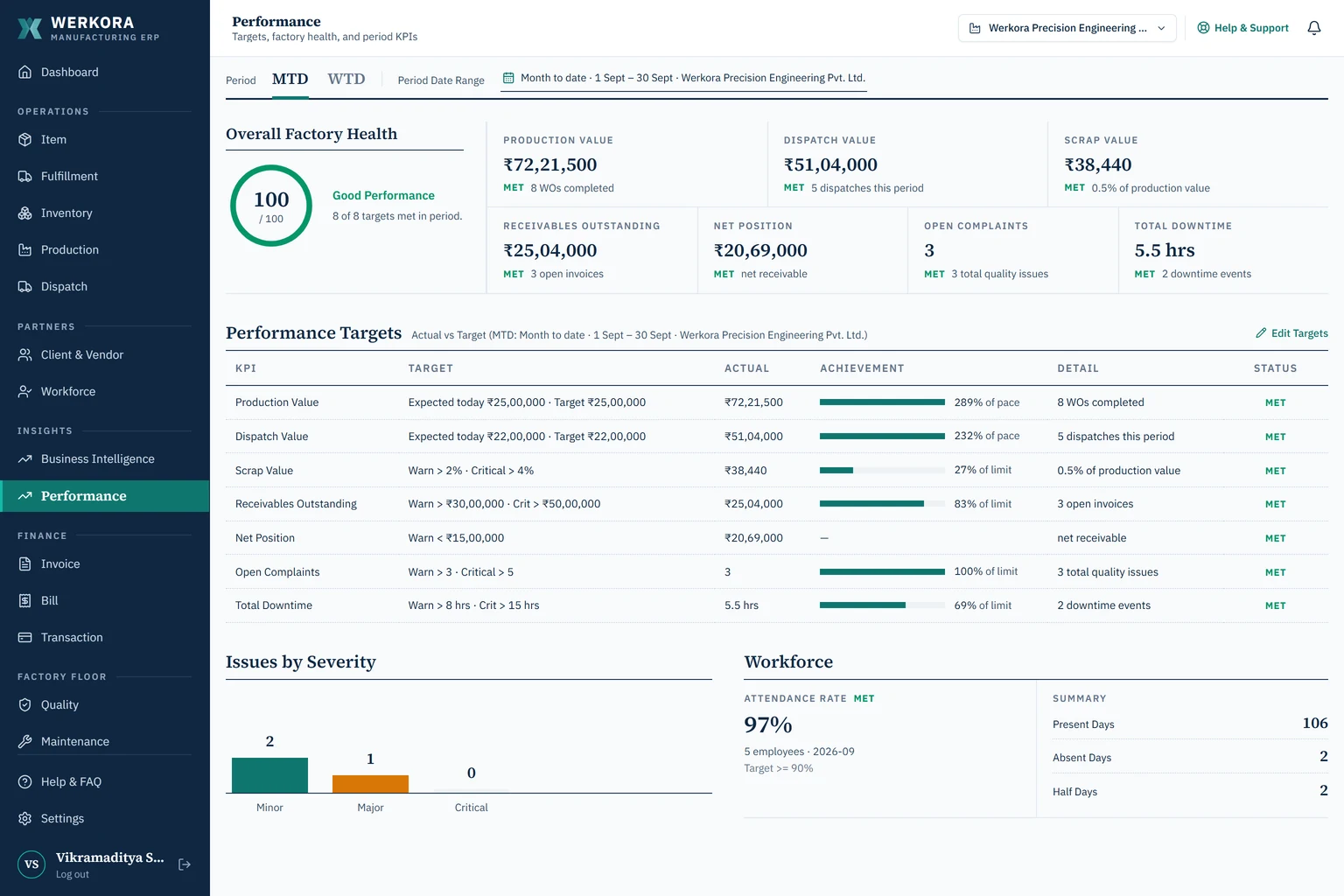
fig. 06 — targets against actualsfull size (opens in a new tab)
· what's inside
the modules
Operationsitems & BOM, fulfillment, inventory, production, dispatch
Partnersclients & vendors, workforce
Financeinvoices, bills, transactions
Factory floorquality, maintenance
Insightsbusiness intelligence, performance
· decisions
what shaped it
tables over wizards.
My first work-order flow was a multi-step wizard. Supervisors skipped it and went back to paper. I rebuilt it as a dense table with actions on each row.
one record feeds the next.
Nothing is entered twice, so there's nothing to reconcile at month-end.
batches, not totals.
Stock is held by lot, with its rate and age. That's what an auditor asks for and what costing actually needs.
indian paperwork is part of the core.
GST invoices with HSN codes, delivery challans, e-way bill numbers and vehicle details sit in the main flow, not in an add-on.
· where ai fits
mostly, it doesn't
Most of Werkora is ordinary, predictable software, on purpose. AI handles a few bounded judgment calls:
- ranking work orders by urgency
- flagging supplier delivery risk
- spotting scrap that runs above the BOM allowance
These use TypeSafe's structured model, which returns a fixed choice or score instead of free text. Each one has a plain rules-based fallback, and every result records which of the two answered.
I learned this the hard way. Early on, I let a general-purpose LLM write invoice lines straight into the database. Amounts came back as text and made-up fields appeared. Inserts failed. Now every model output is checked against a schema before it touches anything.
· what broke
and how i fixed it
a schema change locked a busy table.
Altering the inventory transactions table during heavy batch transfers caused lock timeouts and briefly blocked new work orders. Migrations now run in steps: add columns, build indexes separately, backfill last.
concurrent edits clashed.
Operators logging scrap while a supervisor re-prioritised work orders left records out of sync. Those writes now run in PostgreSQL transactions with advisory locks, so a batch can't be used twice.
· the build
how it's built
Next.js, React and TypeScript on the front; a Hono API on Node.js; PostgreSQL; Docker. It runs in the cloud or self-hosted, and is covered by 260+ automated tests.
i build with AI coding tools. i decide what gets built, test it on real cases, and own what breaks.